How typography gives brands their identity
2026-10-28 · 48 min read
Typography is the design and arrangement of written characters for display or reproduction, encompassing the choice of letterforms, their size and spacing, and their organization within a page or screen. Although the term is closely associated with printing, contemporary typography also includes text on websites, phones, packaging and signs, where the arrangement must accommodate different viewing distances, formats and amounts of information.
In brand identity, typography provides a recurring visual feature through which an organization can present its name and communications. Coca-Cola's connected script, Google's geometric lettering and IBM's related Plex families illustrate different approaches to this role: a fixed name can be drawn as a single composition, while a reusable family must accommodate changing words, languages and reading conditions. Their differences are best understood through the work each design was developed to perform, rather than through rules that assign a particular personality to every category of type.
Typography and visual identity
A brand is the identity associated with an organization, product or service, while its visual identity consists of the visible features used to represent it, including symbols, colors, photography and typography. A logo is an identifying graphic, and a logo composed primarily of a designed name is commonly described as a wordmark. These terms refer to related parts of an identity rather than interchangeable names for the same object: the lettering on a bottle may be a wordmark, whereas the repeated colors and text treatments across its packaging belong to a broader visual identity.
Typography also organizes information through hierarchy, the relative emphasis given to different parts of a composition. On an event poster, the title, organizer, time and location can be distinguished by size, weight, position and surrounding space, allowing the event name to remain prominent while its practical details form a separate group. In the fictional “Short Film Night” example below, both versions contain identical information, but the right-hand arrangement assigns different visual roles to the title and supporting details.
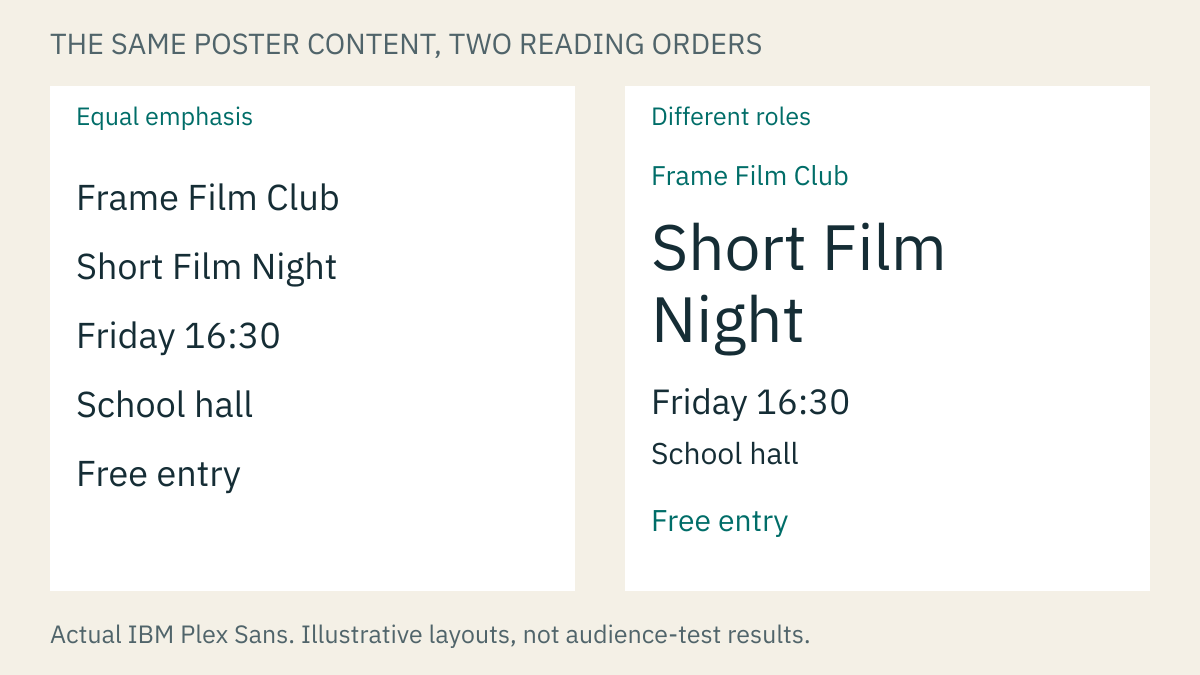

Figure 1. The same five lines set in IBM Plex Sans. The left layout gives them equal emphasis. The right makes the event prominent and groups the practical details below it. Original fictional example; no audience test was performed. Each figure in this article opens at full size.
The example separates two decisions that are often confused when learning design: choosing the appearance of the letters and arranging the information those letters carry. A suitable typeface supplies the forms, but the layout establishes their relative importance; neither decision compensates for missing information. For a school club producing a poster, ticket and phone announcement, a repeated name treatment can identify the organizer across all three formats, while the event details are rearranged according to the available space. Consistency therefore depends on recurring relationships between elements as well as on recurring font names.
Typefaces, fonts and letterforms
A typeface is a design of letters, numerals and other characters, such as IBM Plex Sans, while a font is a usable implementation of that design, often supplied as a file containing a particular style. Everyday usage frequently treats the two words as synonyms, although the distinction becomes useful when obtaining software or selecting styles: a typeface may include several related designs, and a downloaded font file may provide only one of them. A family groups related styles, such as regular, bold and italic, whose shared characteristics allow them to be used together [1].
The lines and curves forming a letter are its strokes, and their relative thickness is described as weight. Light and bold styles differ in stroke thickness, while italic styles introduce a sloping treatment and may also change the underlying shapes. An individual drawn form is a glyph, which may represent a letter, numeral, punctuation mark or another character. These distinctions explain why a family needs more than an alphabet: its punctuation, numbers and available styles must also support the text in which it will be used [1].
Three broad categories can be recognized through the construction of their letterforms:
| Design | Characteristic forms | Example in the figures |
|---|---|---|
| Serif | Small finishing strokes at the ends of main strokes | IBM Plex Serif |
| Sans-serif | Letters without those finishing strokes; “sans” means “without” | IBM Plex Sans and Google Sans |
| Script | Forms derived from handwriting, sometimes with connected letters | Coca-Cola's drawn lettering |
The categories describe structural features rather than fixed meanings or levels of quality. Whether a serif design appears formal, or whether a sans-serif design remains clear at a small size, depends on its particular shapes and use. Monospaced identifies a separate property: each character is allotted the same horizontal space, so an i occupies as much width as an M. In a proportional design, the widths vary according to the character; IBM Plex includes both approaches, making their different spacing patterns visible within a related group of typefaces [2].
Letter anatomy and apparent size
The empty space enclosed by a letter's strokes is called a counter, as in the interior of an o, while letters such as e combine internal space with an opening. These spaces are part of the design because their proportions affect how the form appears, particularly when it is displayed at a small size or in a heavy weight. Most letters sit on an imaginary baseline, and the height of a lowercase x above that line is the x-height, which describes the height of the main lowercase bodies without including the taller part of h or the descending part of p [3].
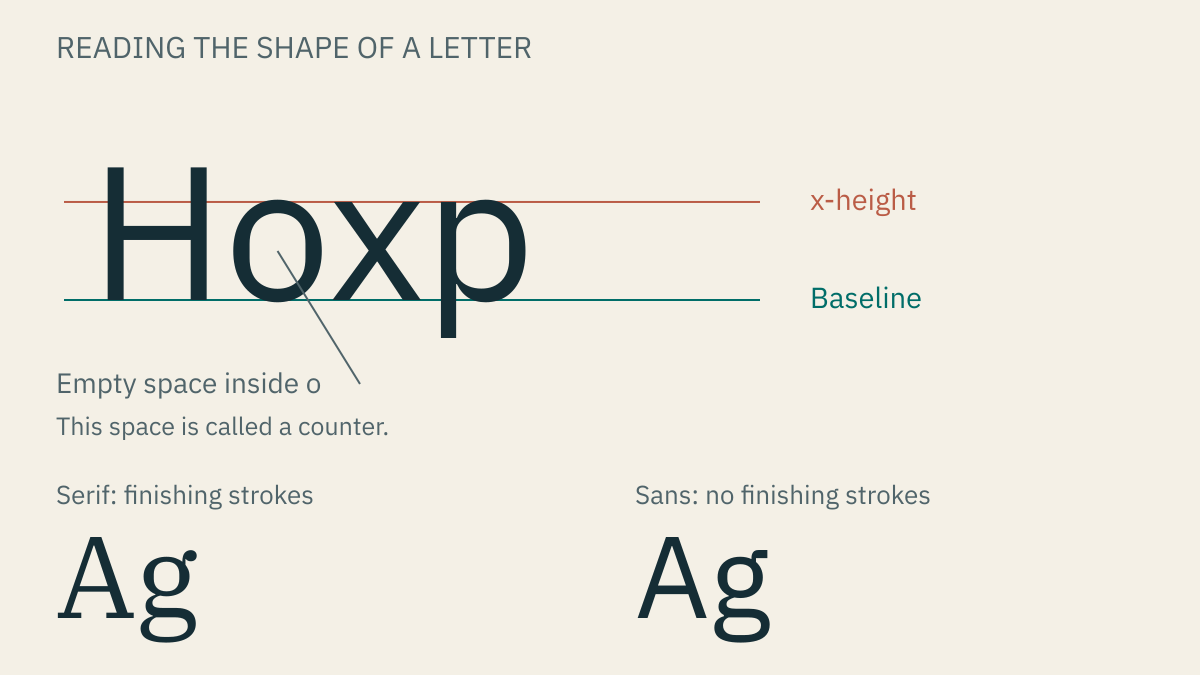

Figure 2. Actual IBM Plex letterforms with guides. The x-height guide is calculated from the font's x outline. The lower examples show the finishing strokes in Serif and their absence in Sans. Original explanatory figure.
Letter anatomy provides a vocabulary for observations that would otherwise remain vague. A line may appear crowded because its internal spaces are closing up, because the lowercase bodies are relatively large, or because the distance between lines is insufficient. Conversely, two fonts set to the same numerical size may appear different in scale because that setting refers to an overall measuring system rather than the visible height of every letter. Comparing actual text at its intended size is therefore more informative than matching the number in an application's size control [3].
Lettering before reusable type
The history of letterforms begins earlier than the history of fonts. Writing systems provided ways of recording language through visible signs, while the shapes of those signs changed with the tools, materials and communities using them. The Latin alphabet used in the English names discussed here developed through a particular sequence of related alphabets, including Greek and Etruscan precedents; other writing systems have their own histories. Research on early alphabetic inscriptions places important developments in the second millennium BCE, long before printing presses or computer files [4].
Lettering generally refers to drawing letters for a particular composition, whereas calligraphy concerns making written forms through controlled movements of a writing tool. Both can influence type design, although a drawn name and a reusable alphabet impose different requirements. A lettering artist can alter a connection to fit one word; a type designer must anticipate combinations that have not yet been written. Coca-Cola's signature later provides an example of a specific composition derived from a handwriting tradition.
Manuscript production also involved choices about the intended use of a text. Medieval scribes used different scripts for formal books and for documents that needed to be written more quickly. In the formal script called textura, common in European manuscripts of the thirteenth to fifteenth centuries, letters were constructed from separate strokes, with frequent lifts of the pen. Cursive scripts allowed more continuous movement. The contrast helps explain why historical letters can appear angular, dense or connected: their construction reflects a writing process as well as a visual preference [5].
Movable type and Gutenberg's printing system
Printing allowed marks to be transferred from a prepared surface rather than written individually on every copy. With woodblock printing, an entire page could be carved into a block, inked and impressed onto paper. Movable type separated the page into reusable characters, which could be arranged for one text and rearranged for another. Florida State University's historical guide dates Bi Sheng's movable-type work in China to 1041–1048, several centuries before Gutenberg's work in Europe [6].
Metal movable type also preceded Gutenberg. The surviving second volume of the Korean Buddhist book Jikji, printed at Heungdeoksa in Cheongju in 1377 and now held by the Bibliothèque nationale de France, is the oldest known surviving book printed with movable metal type. This distinction concerns surviving evidence; it does not establish that no earlier metal-type printing occurred [7].
Johannes Gutenberg's contribution was the development of a workable European production system in Mainz around the middle of the fifteenth century. His equipment brought together reusable metal letters, a method of making them in quantity, suitable ink and a press. Describing this as a system is important because an alphabet of metal letters would accomplish little without a reliable way to cast, arrange, ink and impress them [8].
In the casting process, a raised letter was cut into a steel punch, which was struck into softer metal to create a recessed matrix. The matrix was placed in a hand mould and molten metal was poured into it, producing a piece of type with a raised printing face. Repeated casting supplied multiple copies of the same character. A compositor assembled these pieces into lines and pages, with the letters reversed so that their impressions would read correctly; ink and pressure then transferred the assembled text to paper. Mainz's account of Gutenberg's equipment describes how the mould and press supported this repeated production [9].
The Gutenberg Bible illustrates both the change in production and the persistence of manuscript practice. The Library of Congress dates its printing in Mainz to 1454 or 1455 and describes how specialists subsequently added colored headings and initials by hand. The printed pages therefore did not eliminate every stage of handwritten bookmaking. Their dense letterforms also belonged to the book culture of the period, rather than anticipating the sans-serif lettering associated with many modern brands [10].
Reusable type made consistency a practical requirement. A page needed many copies of common letters, compatible heights and predictable spacing, while a book required those pieces to survive repeated arrangement and printing. The designer's work consequently extended beyond an attractive individual letter to a system of forms that could be combined across large amounts of text. The same requirement remains relevant when a digital font supplies letters for a name, a timetable and a paragraph.
From hand composition to photographic letters
Printed lettering did not remain fixed in the forms used by Gutenberg. Printers developed designs for different languages, reading habits and book formats. At the Venetian press of Aldus Manutius, compact italic type helped support smaller books in the early sixteenth century. Stanford's account of its historical book collection connects the sloping forms to handwriting and explains their relationship to economical use of paper. The italic option in a contemporary font menu thus has a history in book production, even though modern italic designs vary considerably [11].
For much of the history of metal type, composition required arranging individual pieces by hand. Mechanization changed the rate at which text could be prepared: Ottmar Mergenthaler's Linotype, introduced in 1886, used keyboard selection and a casting mechanism to produce a complete line of type in one piece. The Science Museum Group preserves examples showing stages of this process. Faster composition mattered particularly where large quantities of changing text had to be printed, such as newspapers [12].
Phototypesetting subsequently allowed letters to be formed through light rather than a raised metal printing surface. In these systems, photographic character patterns could be exposed onto light-sensitive material, which became part of preparing the printed page. The Rudolf Hell technical collection describes the transition from photographic patterns to digitally controlled production, including the Digiset system developed in 1965. Its cathode-ray equipment formed characters from stored digital information and exposed them onto photographic material [13].
These developments also explain why a familiar typeface name can identify several related versions. A design adapted from metal to photographic or digital production may require changes to spacing and shapes because its reproduction conditions have changed. Helvetica's history, discussed below, follows this movement between technologies; it should not be understood as a single file that has remained unchanged since 1957 [14].
Early computer lettering and the meaning of a digital font
There is no single unqualified answer to “What was the first computer font?” Early computers displayed letters, drawing systems described characters mathematically, and commercial typesetting equipment stored alphabets for printing, but these were different kinds of implementation. The Computer History Museum describes the Whirlwind computer, operational in 1951, as possibly the first computer to display text and graphics on a video terminal. A character shown on that equipment was not necessarily a separately distributed font file of the kind downloaded today [15].
An early documented approach to computer lettering appears in A. V. Hershey's Calligraphy for Computers, a 1967 report from the United States Naval Weapons Laboratory. Hershey described character repertoires intended for computer-controlled output, including letters from several writing systems and scientific notation. Such work addressed the problem of producing written forms through machine instructions, extending beyond the simple display of a limited alphabet [16].
Commercial digital typesetting followed a related but distinct path. The Hell collection documents Digiset's digitally controlled character production, while Linotype's current account describes Digi Grotesk, designed by the Hell Design Studio, as one of the earliest digital typefaces. It is therefore a useful named example from early digital typography, although the source does not establish it as the first computer lettering of every kind. The present Digi Grotesk family is commercially licensed; its historical importance does not make the current font software free to redistribute [13], [17].
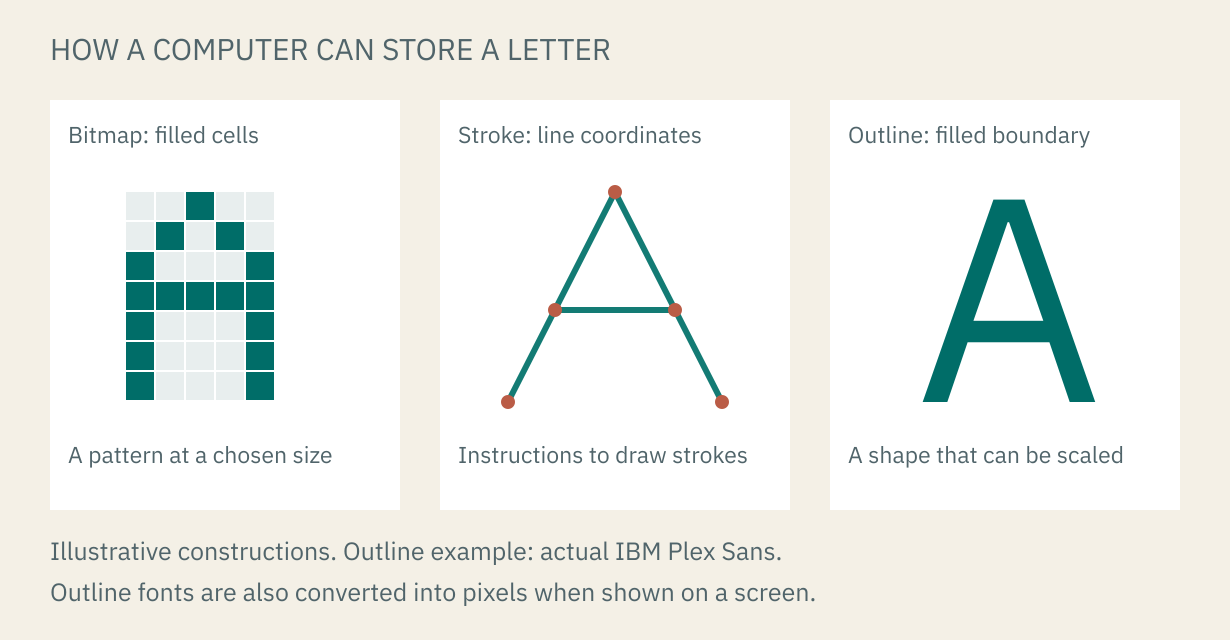

Figure 3. Different ways to represent a letter digitally. The first two constructions are explanatory schematics, not reconstructions of Whirlwind, Hershey or Digiset characters; the outline example uses actual IBM Plex Sans. Outline fonts are also converted into pixels for display on a screen [18].
A bitmap stores a pattern of filled and empty cells at a particular resolution. A stroke representation records instructions for drawing lines, while an outline representation describes the boundary of a shape that can be filled. These approaches should not be treated as a simple sequence in which one immediately replaced all the others: their suitability depends on the output device and the task. An outline can be scaled before it is converted into the pixels required by a screen, whereas enlarging a small bitmap also enlarges the original pattern of cells [18].
The original Macintosh brought carefully designed screen lettering into a personal-computer interface. Susan Kare's firsthand account describes developing its early fonts, including the bold system face eventually named Chicago, whose construction avoided jagged diagonal strokes. Chicago, Geneva, New York and Monaco became examples of designing letters for particular interface roles and screen constraints. Kare also described a deliberately irregular design named San Francisco; that early Macintosh face is distinct from Apple's contemporary San Francisco family introduced decades later [19].
Scalable outlines, web fonts and contemporary typography
As computers became tools for preparing printed pages, text had to work across screens and printers with different resolutions. Adobe's PostScript, introduced in 1984, was a language for describing pages, including their text and graphics. A page-description language is not itself a typeface: it provides instructions that an output system interprets to produce the page. This helped establish a workflow in which a computer could specify a composition for reproduction on different devices [20].
TrueType, developed by Apple, supplied another approach to scalable font outlines. Microsoft's technical overview explains how a rasterizer scales the stored outline, adjusts it to a device's grid and fills the resulting pixels. Instructions known as hinting help control how features align at small sizes, where a fraction of a pixel can change the apparent thickness or clarity of a stroke. Scalable design therefore did not remove the need to consider the final display; it changed where those adjustments could be made [18].
OpenType, developed by Microsoft and Adobe with its first specification released in 1997, extended the earlier font technology. In addition to outlines, a font could include information for substituting and positioning glyphs, such as connected letter combinations or alternate numeral forms. This matters because writing does not always consist of placing an independent shape beside the next one: scripts may require contextual forms, and a typeface may provide several glyphs for the same character. A font's actual language and feature support depends on its contents, rather than on the format name alone [21].
Web fonts brought downloadable font software into the browser's page-layout process. CSS allows a website to declare a font for its text, while formats such as WOFF2 package font data in compressed form for delivery over a network. The browser still needs to select, position and render the appropriate glyphs after receiving the file. A website's type choice consequently involves both the appearance of its text and practical questions about download size, available characters and fallback fonts [1], [22].
Contemporary variable fonts store adjustable designs within a font file, allowing an application to select positions along supported controls such as weight or width. These controls are called axes, and their available ranges depend on the individual font [23]. A variable design can therefore provide intermediate weights or narrower forms without requiring a separate file for every selection, although it does not automatically include every style or language.
The historical progression connects directly to brand identity. Hand lettering can give a fixed name a distinctive composition; reusable type supports changing text; and digital families extend that consistency across websites, applications and different screen sizes. The following examples examine how particular organizations used these possibilities, beginning with Helvetica's origins in metal type and continuing through Microsoft's distribution of Arial and Apple's development of its current system fonts.
Helvetica and its development at Haas
Helvetica originated at the Haas Type Foundry in Münchenstein, Switzerland, where managing director Eduard Hoffmann commissioned Max Miedinger to develop a new sans-serif design in 1956. Hoffmann directed the project and Miedinger drew the letterforms, producing the first release in 1957 under the name Neue Haas Grotesk, meaning “New Haas Sans Serif.” In this context, grotesk is a historical name for a sans-serif typeface, rather than a description of something ugly. The project entered an established market for such designs, including Berthold's Akzidenz-Grotesk [24], [14].
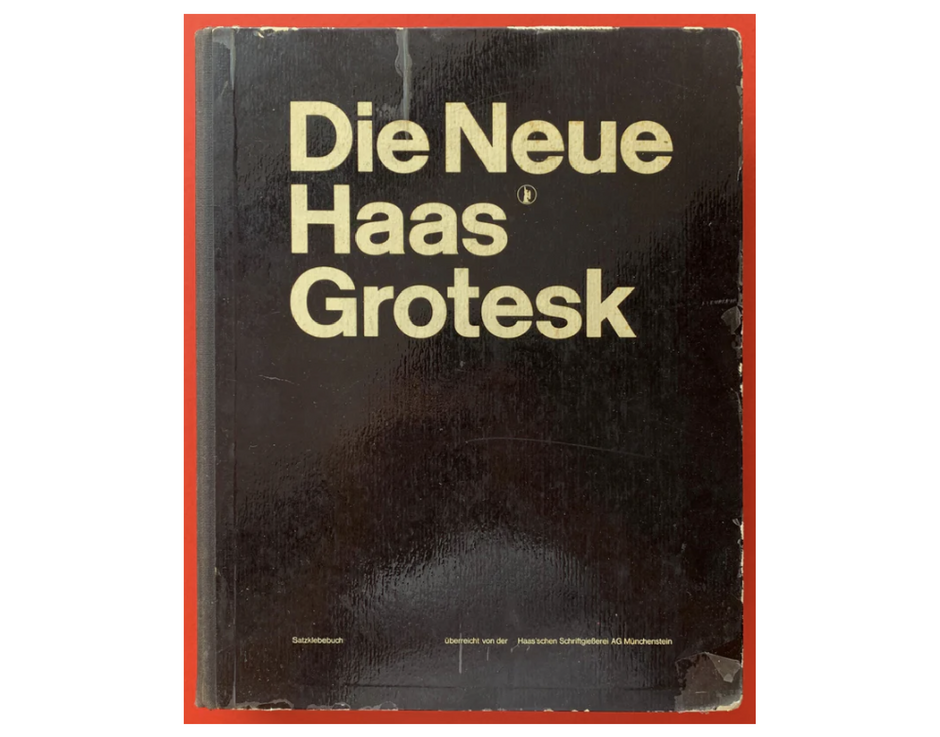

Figure 4. A Neue Haas Grotesk specimen book reproduced in MyFonts' historical account. Source image: MyFonts / Monotype. The cover preserves the name used before Helvetica; it is historical specimen artwork, not text recreated in a substitute font [14].
When the German foundry Stempel marketed the design beyond Haas's existing customers, the name changed to Helvetica, derived from Helvetia, the Latin name for Switzerland. Its development continued as production moved from hand-set metal type to machine composition, phototypesetting and digital fonts. These transitions altered proportions and spacing, so the name identifies a history of related designs rather than one unchanging set of outlines [24].
Neue Helvetica, drawn in 1983, reorganized the family into a more consistent system of weights and styles, while the later Helvetica Now introduced further refinements and optical sizes. This distinction becomes relevant to Apple's history because its use of Helvetica Neue concerned a later member of the family, rather than the original metal type released in 1957. MyFonts also warns that substituting one Helvetica generation for another can change spacing, weight and structural details, affecting an existing layout [14].
Availability: proprietary, commercially licensed. Helvetica and its related families are offered under commercial font licenses. Inclusion with an operating system or application does not turn them into open-source fonts; a separate use, such as hosting font software on a website, requires the applicable rights [25].
Arial, Monotype and Microsoft's adoption
Arial was designed at Monotype rather than within Microsoft. Microsoft's own account attributes the original 1982 design to Robin Nicholas, who developed it for low-resolution laser printers, and describes its subsequent expansion into a family with Patricia Saunders. Microsoft licensed Arial for Windows 3.1 in 1992, making it available through the operating system rather than requiring every user to obtain a separate font package [26].
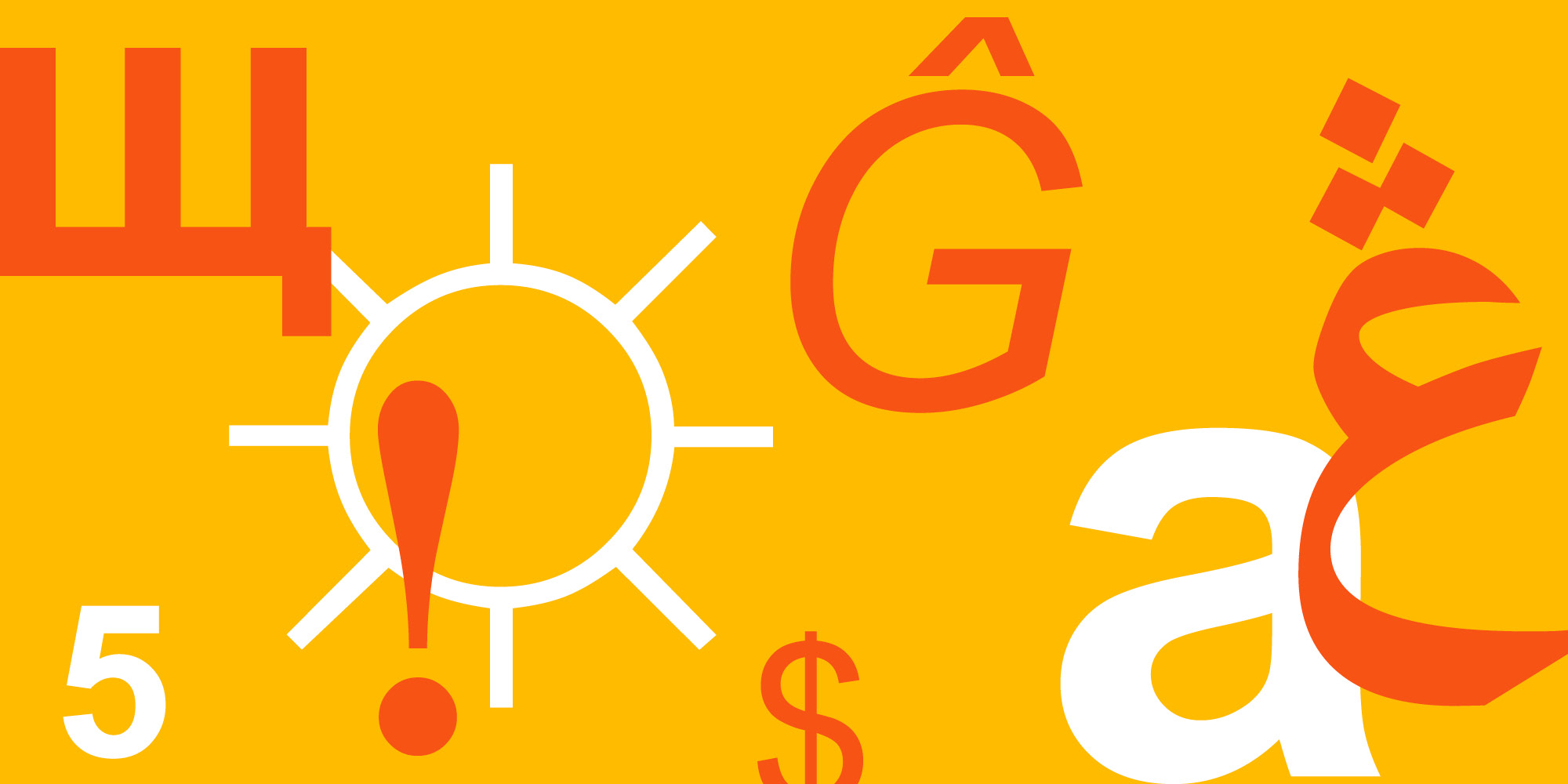

Figure 5. Actual Arial characters in Microsoft's published specimen. Artwork: Microsoft. The lowercase a, accented G and numeral show that the family supplies forms for ordinary text as well as prominent names; the specimen also includes other writing systems [26].
Microsoft describes Arial's curves as comparatively soft and full, with diagonally cut stroke endings, showing why it should be examined as a particular design even when it appears similar to other sans-serif families. Its association with Microsoft comes from licensing and distribution, while the design attribution belongs to Monotype [26].
Availability: proprietary, supplied with applicable Microsoft products. Microsoft's guidance permits ordinary printed and graphic output using Windows-supplied fonts, subject to the application's terms, but does not grant general permission to copy those font files to a website or redistribute them. Arial can therefore be available for a school poster on a licensed Windows installation without becoming a free font package to share with others [27].
Coca-Cola and the drawn wordmark
Coca-Cola attributes its name and initial lettering to Frank M. Robinson, the bookkeeper associated with John S. Pemberton, and connects the design to the company's beginnings in 1886. Its historical account identifies the lettering as Spencerian script, a form of handwriting popular in the late nineteenth century. The reference to Spencerian describes the tradition behind the drawing, rather than the name of an official font that can reproduce the wordmark through ordinary typing [28].
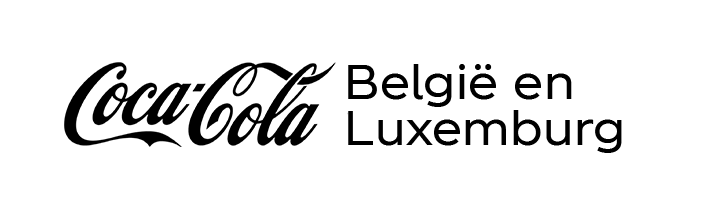

Figure 6. Actual Coca-Cola lettering in a regional corporate signature. Artwork: The Coca-Cola Company; white margins added. Compare the connected script with the separate letters in the regional name [28].
The large C forms, connecting strokes and extended curves belong to a composition developed around a fixed name. Their proportions and connections distinguish the wordmark from text set in a broadly similar script, whose letters must accommodate many different words. This distinction matters when designing an identity: a fixed name treatment can retain elaborate or closely connected forms, while changing information such as dates and locations requires letters that remain usable in a wider range of combinations.
On an event poster, a distinctive organizer's name can occupy this fixed role without determining the treatment of every line below it. The identity then rests partly on the repeated name, while the supporting typography responds to the information being communicated. Coca-Cola's lettering illustrates the relationship between a recognizable signature and the other text appearing alongside it.
Availability: proprietary brand lettering. The cited company history supplies no general-purpose font license, and Spencerian should not be treated as an official downloadable Coca-Cola font [28].
Google and the transition from display lettering to interface text
Google introduced its geometric sans-serif identity in 2015, with letterforms organized around simple shapes, particularly circles. The accompanying Product Sans design supported arrangements pairing Google's name with product names. Although geometry was central to the identity, the designers also described adjusting the compact G so that its circular form and crossbar appeared balanced, an example of an optical adjustment made according to visual appearance rather than mathematical regularity alone [29].
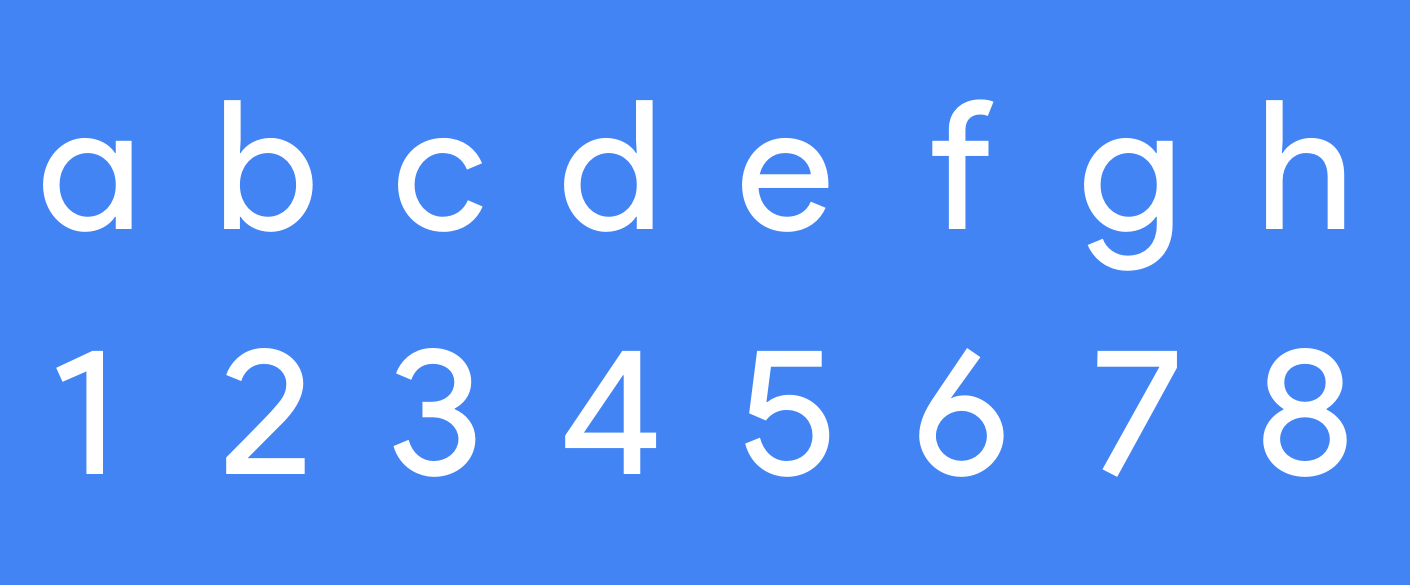

Figure 7. Product Sans letters and numerals, cropped from page 4 of Google's 2015 specimen. Artwork: Google. Inspect the round parts of b and d and the single-storey a, which has one main enclosed space [29].
Google's account of its later font development identifies a limitation of Product Sans: its design for prominent product-name treatments did not provide the same suitability for longer passages and small phone text. Google Sans, introduced in 2018, addressed a broader range of uses, followed by further work on small-text requirements. The company also describes its 2025 decision to open-source Google Sans and Google Sans Flex [30].
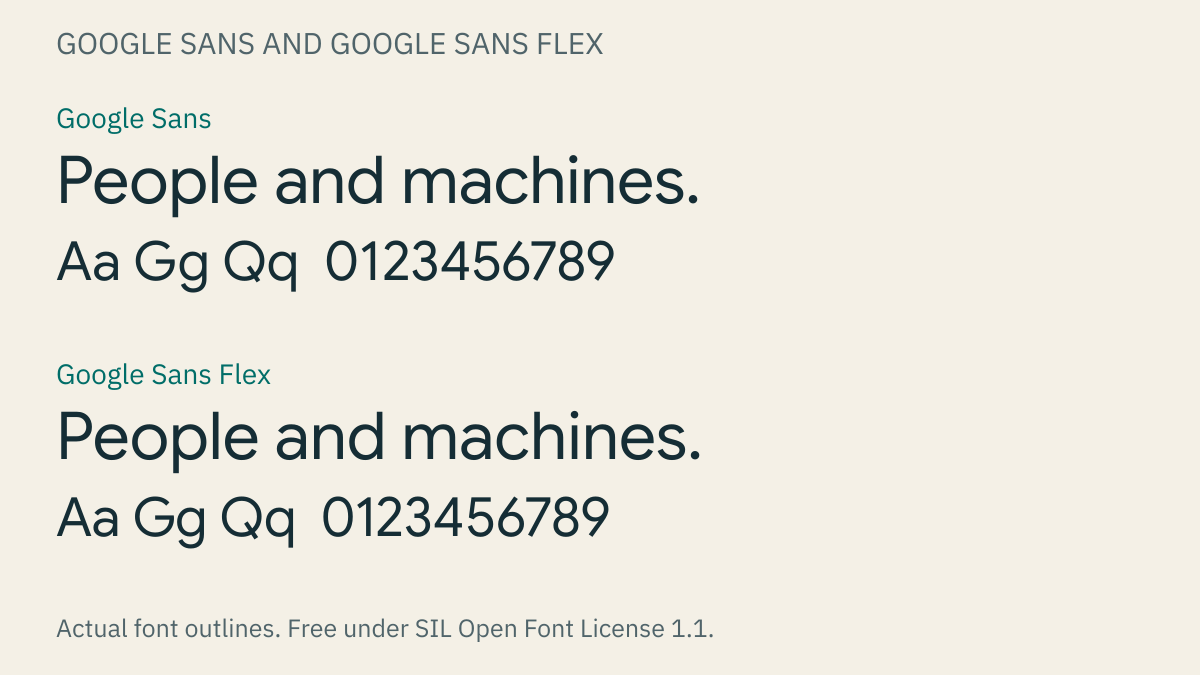

Figure 8. Actual Google Sans and Google Sans Flex set “People and machines.” and a short letter-and-number sample at matching size settings. Original specimen made from the distributed font files [31], [32].
The development illustrates the distinction between display text, used for prominent short treatments such as names and titles, and body text, intended for sustained reading. A design that appears balanced in a large name may require different proportions or spacing when used in a small sentence. On a school poster, the event title and the paragraph explaining admission consequently need separate examination, even if their letters belong to related families.
Availability: Product Sans is restricted and not open-source; Google Sans and Google Sans Flex are free under SIL Open Font License 1.1. The open licenses permit personal and commercial use subject to their conditions, whereas Product Sans has a separate availability statement [31], [32], [33].
IBM Plex and related families
IBM Plex was developed with IBM designer Mike Abbink and the type foundry Bold Monday, whose project account spans 2016–2023 and describes the relationship between people and machines as a central influence. A foundry is an organization that produces typefaces, a term inherited from the manufacture of physical type. IBM distributes Sans, Serif, Mono and Sans Condensed designs within Plex, providing related forms for different kinds of communication [34], [2].
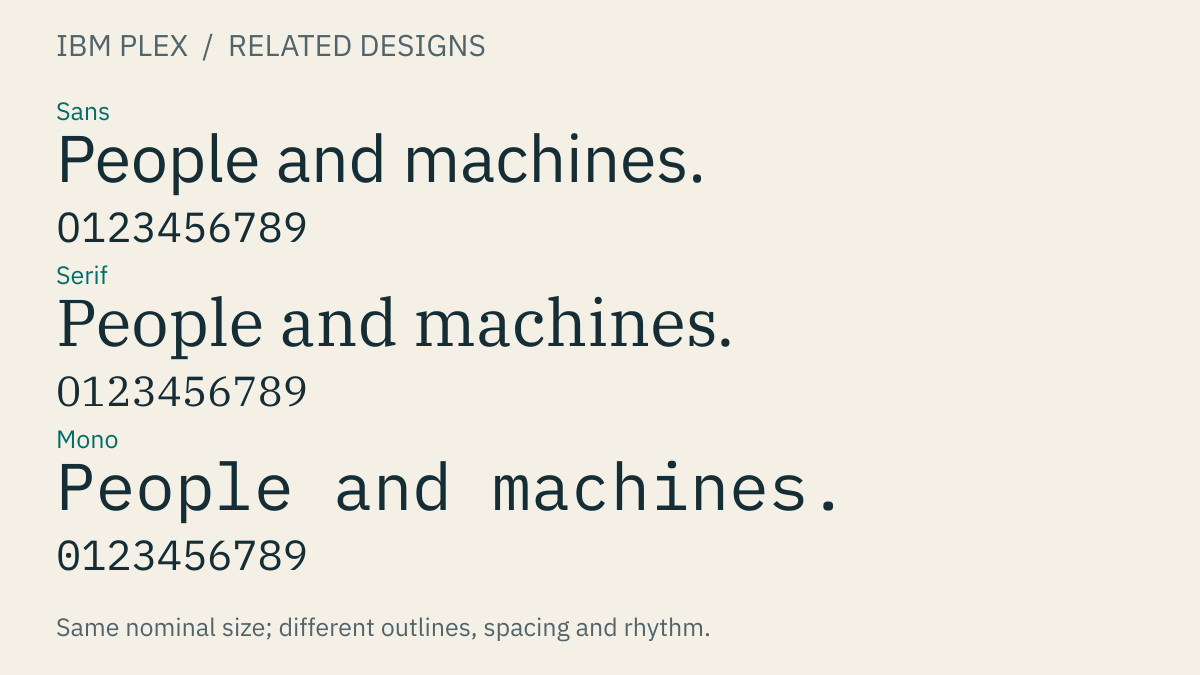

Figure 9. Actual IBM Plex Sans, Serif and Mono set the same sentence and numeral string. Original specimen made from the font files. Open it at full size to compare individual letters [2].
The specimen makes those differences visible without changing its wording. Serif includes finishing strokes absent from Sans, while Mono gives each character equal horizontal space, producing a different pattern around narrow letters such as i and wide letters such as m. Bold Monday identifies historical typewriter lettering among the family's influences; the Mono design expresses that association through equal character spacing, while the proportional designs accommodate other reading tasks [34].
Related families allow an identity to vary according to the material being presented. Aligned characters can be useful in a code example, whereas a paragraph of explanation has different spacing requirements; a project can assign each treatment a role while retaining visual relationships across the page. Plex is consequently useful for learning how several designs can belong to one identity without being applied identically to every kind of text.
Availability: free under SIL Open Font License 1.1. Commercial use is permitted under the license, while redistribution must retain the required notices and modified fonts must respect the reserved name “Plex” [35].
Apple's use of Helvetica Neue and San Francisco
Apple's interface typography has included Helvetica Neue as well as its own later San Francisco family. In OS X Yosemite, released in 2014, Helvetica Neue replaced Lucida Grande as the Mac's system font, affecting recurring elements such as window titles and controls. John Siracusa's contemporary hands-on review documents the change and observes that the same text could occupy different widths under the new design [36]. A system font serves these changing interface labels, which is a different task from drawing the company's fixed logo.
In 2015, Apple announced San Francisco as the new system font for OS X El Capitan, while WebKit's account of the transition identifies its use in both iOS 9 and OS X 10.11. The WebKit article also explains how web content could request the platform's system font, allowing it to follow the operating system's typography instead of relying on an internal font name [37], [38]. This established San Francisco as part of the interface rather than merely a lettering style attached to an individual product.
San Francisco, abbreviated SF, was designed by Apple around the requirements of its platforms. The present family includes SF Pro for proportional interface text, SF Compact for small sizes and narrow columns, and SF Mono for coding environments where equal character widths support alignment. New York is a companion serif family rather than another sans-serif variant of SF [39].
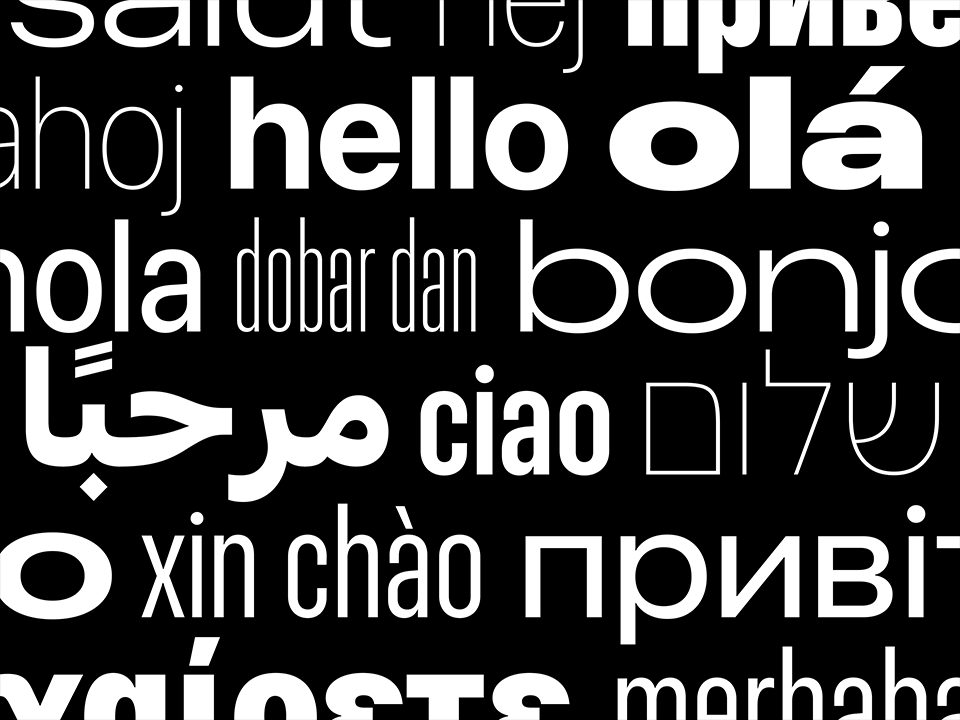

Figure 10. Apple's published San Francisco artwork, placed on black for visibility. Artwork: Apple. Compare “hello” with the narrow “xin chào” and the other language examples. This is the publisher's image; no Apple font file was used to generate it [40].
San Francisco's development illustrates why a screen font may need more than one drawing of each letter. Apple's original SF Text was intended for sizes below 20 points, while SF Display served 20 points and above, with differences in spacing and vertical proportions that helped the smaller text retain its apparent size and separation. These are optical sizes, adaptations to the intended reading scale rather than simple enlargement or reduction of a fixed outline [41].
Apple's 2020 typography presentation describes the transition toward variable fonts combining optical sizes and weights, allowing the design to adapt through a range instead of depending only on separate Text and Display files. For a beginner, the important distinction is between making text larger and changing its size-specific design: the first changes scale, while the second adjusts details and spacing within that scale. Apple's system software coordinates these adjustments when its system fonts are used [41].
The family subsequently expanded in width as well as weight. At WWDC22, Apple presented Condensed, Compressed and Expanded styles alongside the regular width, illustrating their use in Photos titles, News headlines and Maps labels. A narrower headline can occupy fewer lines, while a wider map label can establish a different visual treatment; each remains part of the same family, with its suitability determined by the reading task. The presentation also cautions that the dense Compressed style may be too tight for longer passages [39].
Apple's Dynamic Type guidance addresses a further requirement: readers can choose larger text, and the interface must accommodate the resulting change in space. A button may need additional height, or a line may wrap, so the reading experience depends on both the font and the layout containing it. Checking an announcement with enlarged text or a longer translated name can expose collisions and hidden information that are absent from a short sample at its default size [42].
Availability: no-cost download under restricted Apple terms, not an open-source license. The published San Francisco agreement limits use to specified Apple-platform interface mockups and excludes general website-content use and font embedding; the availability of a download therefore does not establish permission for an unrelated poster or website [40].
Netflix Sans across promotional and reading formats
Dalton Maag describes Netflix Sans as a custom family developed with Netflix's marketing and product teams, with project dates spanning 2017–2023 and uses ranging from billboards to small subtitles. Its listed writing-system coverage includes Latin, a Vietnamese extension, Greek and Cyrillic, reflecting the need to accommodate more than an English alphabet [43].
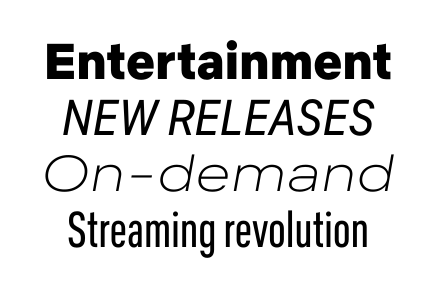

Figure 11. Actual Netflix Sans in the designer's published specimen. Artwork: Dalton Maag / Netflix, unchanged. The four phrases show different weights, widths and sloping forms [43].
The published specimen presents several treatments within the family: a bold first line, an uppercase second line and a narrower final line produce different visual shapes. Width determines how much horizontal space a design requires, while case distinguishes uppercase or capital letters from lowercase forms. These properties can help assign emphasis or fit text into a format, although a narrower style must still be examined at the size and under the conditions in which it will be read.
A similar problem arises when an event identity is extended from a poster to a compact ticket. The title and small practical details may need different treatments, and the selected family must provide styles capable of performing those roles when the content changes. Netflix Sans illustrates this requirement through a custom family developed for both prominent promotion and smaller reading formats.
Availability: proprietary and exclusive to Netflix. Dalton Maag's project page offers neither a free public download nor a retail license for the family [43].
Spotify Mix and variable design
Spotify announced Spotify Mix on May 22, 2024, describing a custom typeface developed with Dinamo to replace the font in its app and desktop experiences. Dinamo's account identifies a broad range of weights and widths, alternate characters and influences from different letterform traditions, connecting this variety to the range of music and other audio presented by Spotify [44], [45].
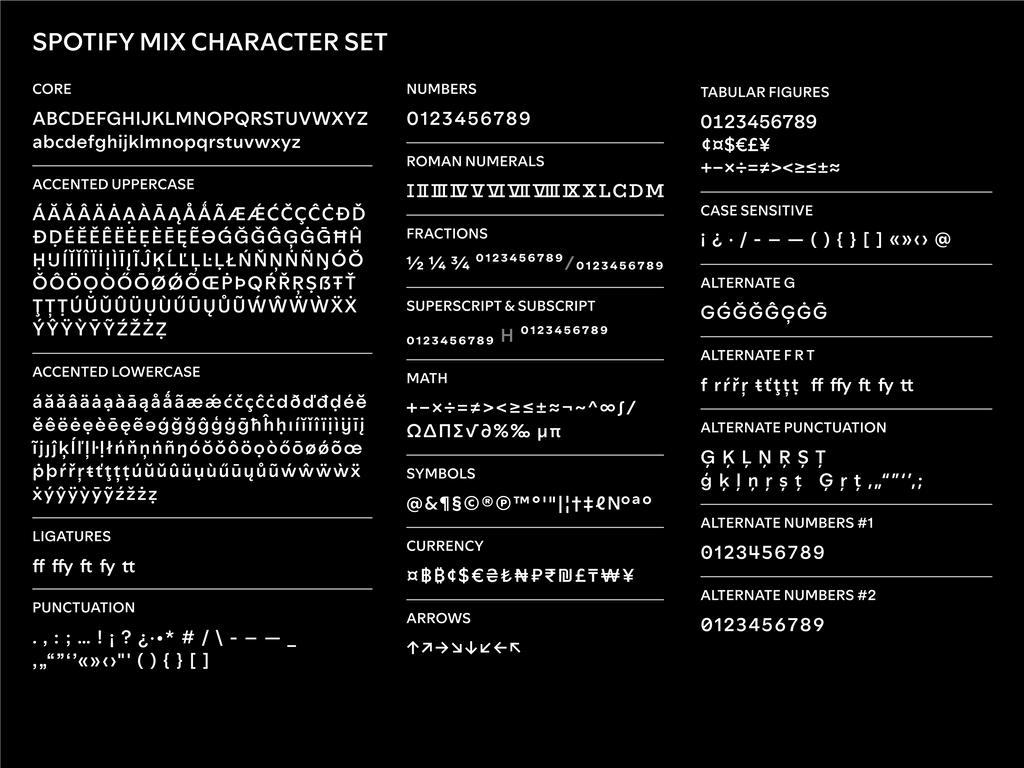

Figure 12. Actual Spotify Mix in Dinamo's published character chart. Artwork: Dinamo / Spotify. The right-hand column includes alternative G shapes and three number treatments. Open the chart at full size to inspect them [45].
An alternate is another drawn form available for the same character, such as the different G shapes in the chart. The specimen also includes accented letters, punctuation and several numeral treatments, showing the extent of a character set beyond its basic alphabet. These variations are part of the designers' stated approach to the identity; the published accounts do not supply measured evidence that a particular form changes audience response.
Spotify Mix is a variable font, whose adjustable controls are called axes. A weight axis changes stroke thickness, while a width axis changes letter proportions within the range supplied by the design [23], [45]. The flexibility allows a family to support several treatments, but a typographic system still needs repeatable settings for particular roles. A title style applied across several announcements provides a more consistent basis for revision than an unrelated width and weight chosen for each line.
Availability: proprietary custom font for Spotify. Spotify describes Mix as exclusive, and the cited publications provide no public download or retail license [44], [45].
Font availability and licensing
Font choice includes both design suitability and permission to use the software. Free describes price, whereas open-source describes permissions granted under an open license; a no-cost download may therefore remain restricted. Proprietary fonts are supplied under their owners' terms rather than an open license, and some custom families are available only to the organizations that commissioned them.
| Lettering or family | Availability | Application to a personal project |
|---|---|---|
| Helvetica / Neue Helvetica | Proprietary, commercially licensed | Use under the license supplied with the family or product; not an open-source download [25] |
| Arial | Proprietary, bundled with applicable Microsoft products | Ordinary poster or graphic output is permitted under applicable terms; font-file redistribution and web hosting require separate rights [26], [27] |
| Coca-Cola lettering | Proprietary brand mark | A drawing to study; no official general-purpose font is supplied [28] |
| Product Sans | Restricted, not open-source | Not a free Google Fonts download [33] |
| Google Sans / Google Sans Flex | Free, SIL OFL 1.1 | Personal and commercial use under the license [31], [32] |
| IBM Plex | Free, SIL OFL 1.1 | Personal and commercial use under the license [35] |
| Apple San Francisco | No-cost, restricted Apple license | Specified Apple-platform interface mockups; not a general website-content license [40] |
| Netflix Sans | Proprietary, Netflix-exclusive | No general public font license offered on the designer's page [43] |
| Spotify Mix | Proprietary, Spotify-exclusive | No public download or retail license offered in the cited sources [44], [45] |
The SIL Open Font License, abbreviated OFL, includes conditions governing redistribution and modification of font software. Creating a poster using a font and distributing the font file are separate activities, so the license supplied with a download should be retained and consulted when sharing or modifying the software [31], [32], [35]. The credited images of restricted families in this article are published specimens, which display their letterforms without supplying the underlying font files.
IBM Plex provides a suitable basis for the practical project below because its available designs can be compared with the specimen and obtained from the official distribution. An editor that already includes the family can use it directly; otherwise, its files can be installed through the computer's font installer or the editor's documented import feature. Checking that the required regular, bold and other styles are available before laying out the project prevents a missing style from determining the final design [2], [35].
Free fonts for Vietnamese, Chinese and Japanese
For projects that need broad usage rights without buying a font license, open-source fonts provide a practical alternative to restricted commercial families. The fonts below remain copyrighted, but their SIL Open Font License permits personal and commercial design work, including logos, posters, books, websites, videos and applications. The resulting artwork does not have to adopt the font's license. When distributing the font software, retain its copyright and license notices; modified versions must follow the license, including any reserved-name conditions, and the fonts cannot be sold by themselves [46].
Language coverage requires attention to the actual download. CJK means Chinese, Japanese and Korean, while SC, TC and JP identify Simplified Chinese, Traditional Chinese and Japanese variants. Noto distributes its CJK families separately from its general Latin families; Google Fonts lists regional versions under names such as Noto Sans SC, Noto Sans TC and Noto Sans JP [47]. Installing ordinary Noto Sans therefore should not be assumed to install every Noto writing system.
The ranking below concerns availability of glyphs for the requested languages, with English included alongside Vietnamese. Rank 1 options cover these languages when the specified companion families are installed; Rank 2 requires an additional CJK family. Ties are intentional, since the available sources do not establish a meaningful winner among complete multilingual arrangements. This is a coverage ranking, rather than a ranking of beauty or measured reading performance.
| Coverage rank | Font or coordinated family set | Glyph availability | Vietnamese | Simplified / Traditional Chinese | Japanese |
|---|---|---|---|---|---|
| 1, tied | Noto Sans + Noto Sans CJK | Extended Latin, Greek and Cyrillic in the general family; Chinese characters and Japanese kana in CJK companions | Yes, using the Vietnamese-capable Noto Sans download | Yes, using SC / TC companions | Yes, using JP [47], [48] |
| 1, tied | Noto Serif + Noto Serif CJK | Serif alternative with extended Latin, Greek and Cyrillic; CJK companions for East Asian text | Yes, using Noto Serif | Yes, using SC / TC companions | Yes, using JP [47], [49] |
| 1, tied | Source Sans 3 + Source Han Sans | Extended Latin, Greek and Cyrillic in Source Sans 3; pan-CJK coverage in Source Han Sans | Yes, using Source Sans 3 | Yes, using the appropriate Source Han regional configuration | Yes, using the Japanese configuration [50], [51] |
| 1, tied | Source Serif 4 + Source Han Serif | Extended Latin, Greek and Cyrillic in Source Serif 4; pan-CJK coverage in Source Han Serif | Yes, using Source Serif 4 | Yes, using the appropriate Source Han regional configuration | Yes, using the Japanese configuration [52], [53] |
| 1, tied | IBM Plex Sans + its regional families | Extended Latin, Greek and Cyrillic in the base family; separate Chinese and Japanese packages | Yes, using the Vietnamese-capable base download | Yes, using IBM Plex Sans Chinese SC / TC | Yes, using IBM Plex Sans Japanese [2], [54] |
| 2 | Inter | Extended Latin, Greek and Cyrillic; its listed subsets do not provide Chinese characters or Japanese kana | Yes | Requires a companion such as Noto Sans SC / TC | Requires a companion such as Noto Sans JP [55] |
All six options use the OFL; their language subsets and project packages are documented in the sources attached to their rows. For a first project spanning these languages, Noto Sans with the required regional companions provides a straightforward starting arrangement. A serif treatment can use the equivalent Noto Serif combination, while Source and Plex offer alternatives when their letterforms suit the identity.
A glyph count alone would give a misleading impression of coverage. A font can contain alternate shapes for the same character, while a regional subset can deliberately omit characters needed elsewhere. Noto's download guide distinguishes full-coverage language-specific fonts from smaller regional subsets and explains that selecting a language can also select its appropriate glyph forms [56]. Chinese and Japanese share many characters, but their preferred written shapes can differ; using a Japanese font for every Chinese passage merely because it contains the characters can therefore produce the wrong regional forms. In a document editor, choose the appropriate regional family; on a website, identify each passage's language so that supported font-layout features can select localized forms [56].
Vietnamese uses the Latin alphabet with additional letters and tone marks, so an English-only sample cannot establish whether a font is suitable. Test the installed font with both capitals and lowercase forms, including letters carrying more than one mark, and inspect the space above and below the line. The following strings are coverage checks to paste into an editor with the chosen font selected; their appearance here is not a specimen of each recommended family:
Tiếng Việt: Ă Â Ê Ô Ơ Ư Đ — ắ ằ ẵ ặ ấ ề ễ ộ ớ ừ ữ ự
简体中文:字体设计与品牌
繁體中文:字體設計與品牌
日本語:文字とブランドのデザイン
These samples check a few useful forms rather than the entire character inventory. A project containing uncommon names, specialist notation or historical characters requires testing its actual text. For downloads, use Google Fonts for the Latin families and regional Noto listings, or the official Noto CJK, Adobe Source Han and IBM Plex release pages identified in the references; retain the license file supplied with the package [2], [47], [50], [52].
Kerning, tracking and line spacing
The arrangement of letters remains significant even after a typeface has been chosen. Kerning adjusts the spacing between particular glyphs, accounting for the differently shaped gaps created by combinations such as AV and HH. Tracking, also called letter spacing, changes spacing across a run of text, rather than addressing only a particular pair. Font and text-layout systems treat these as separate controls because they solve different spacing problems [23], [57].
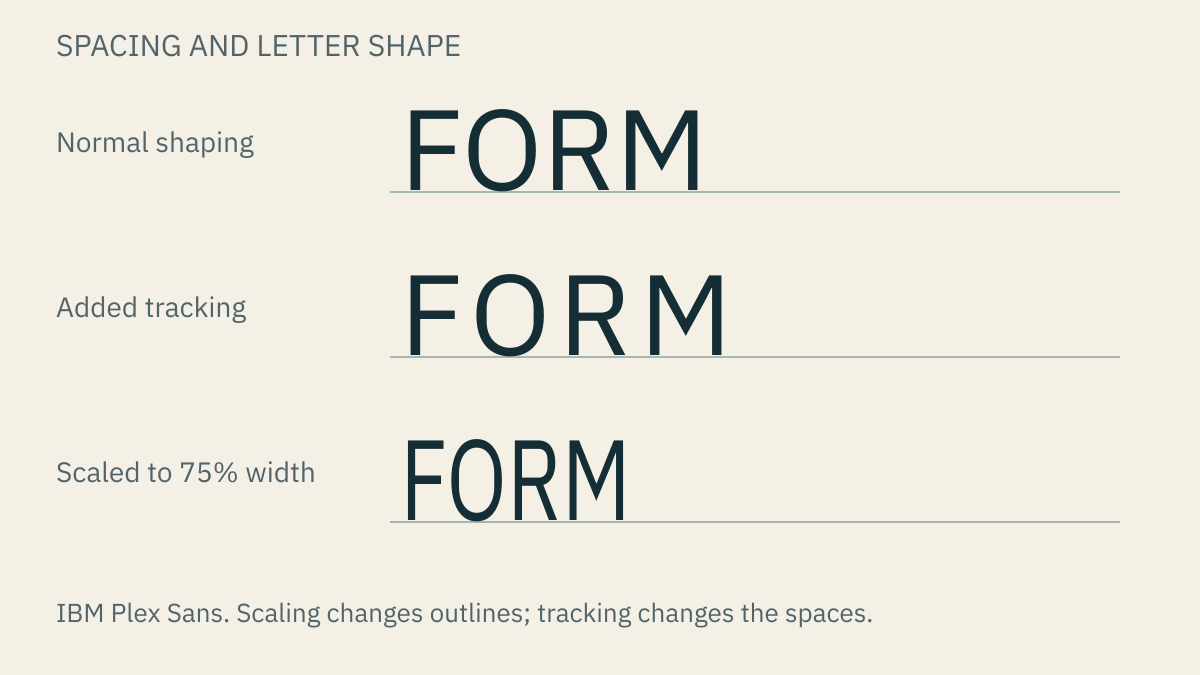

Figure 13. The same word in IBM Plex Sans. The middle row adds eight drawing units between letters. The bottom row scales the outlines to 75% width, making the shapes themselves narrower. Original demonstration, not a genuine condensed font.
In the middle row of the figure, added spacing changes the gaps while retaining the original letter outlines. The final row instead narrows the outlines themselves through horizontal scaling, which differs from a condensed design drawn with narrower proportions. Distinguishing these operations helps identify whether a crowded title needs a change in spacing, a designed width or a different arrangement across lines.
Spacing is examined through the empty shapes between letters at the intended reading size, since equal measured distances can appear unequal when bordered by different forms. A gap that attracts attention may require adjustment to a particular pair, while generous tracking that suits a short capitalized name may disrupt a longer sentence. The surrounding text therefore supplies the conditions for judging the adjustment.
Line spacing is the distance between successive baselines, also known in design applications as leading, a term associated with the strips of lead used to separate lines of physical type [3]. Crowded lines may require a change to this distance rather than a replacement font, especially where a paragraph combines a large lowercase body with little vertical space.
Legibility, readability and language coverage
Legibility concerns the recognition of characters, including distinctions between similar forms such as I, l and 1, while readability concerns following the text as a whole. Clear individual letters can still form a difficult paragraph when its lines are crowded, its line length is unsuitable or its arrangement repeatedly interrupts the reading sequence. Font size, line spacing, background and the amount of text must consequently be examined together.
Contrast between text and its background is particularly relevant for readers with reduced vision. W3C's web-accessibility guidance specifies a Level AA minimum contrast ratio of 4.5:1 for ordinary text and 3:1 for qualifying large text, calculated from the actual colors [58]. A plain light background with dark text simplifies inspection, whereas text over a photograph must remain visible across the different light and dark regions behind its strokes.
Language coverage also affects the result: a font that supplies “hello” may lack some characters required for “xin chào.” Depending on the software, a missing character can appear as an empty box or be supplied by another font, introducing a different form into the line [1]. Apple's artwork and Netflix's listed coverage demonstrate why the intended language belongs in the initial test material rather than being added only after the design is complete [40], [43].
A film-club identity in three formats
The fictional Frame Film Club project applies these principles to an A4 poster, a small admission ticket and a narrow phone announcement. Its information is fixed: the organizer is Frame Film Club, the event is Short Film Night, it starts Friday at 16:30 in the school hall, and entry is free. These are the same facts used in Figure 1, allowing attention to remain on their arrangement rather than on the invention of additional content.
Establishing hierarchy
The first version can use IBM Plex Sans alone, with size, weight and space separating the organizer, title and practical details. On the poster, the event title can receive the greatest emphasis, followed by the time and location; on the ticket, the event and admission information must remain identifiable within a smaller area. The phone announcement introduces another condition because only its top portion may be visible before scrolling, making the placement of essential information part of the design.
Figure 1 supplies one possible poster arrangement, whose hierarchy comes mainly from size and grouping. Other arrangements can give different emphasis, but each needs an intelligible relationship between the information and the space available. Beginning with one family makes this relationship easier to inspect because differences in typeface are not yet competing with differences in scale and position.
Comparing styles within the same layout
A controlled comparison can begin with regular-weight details and a heavier title, followed by a version reversing those assignments. Keeping the wording and positions stable allows the effect of weight to be examined through the prominence of the title and clarity of the small text. A further version can replace only the title with IBM Plex Serif, leaving the supporting details in Sans; the comparison then concerns whether the change creates a useful distinction for the event.
The purpose of a second family is established by the role it performs. A visibly separate title may justify a serif treatment while the details retain the style used on the ticket, but the availability of additional fonts does not itself explain why they belong in the layout. Recording the reason for a choice makes it possible to evaluate that choice when the content changes.
Adapting the identity
The ticket and phone announcement can repeat the organizer's name treatment and the relationship between title and details while changing their arrangement to fit the format. A large poster title may occupy two lines on a phone, preserving its role without preserving its exact position or numerical size. Replacing “Short Film Night” with “Student Documentary Screening” introduces a longer title through which the design's tolerance for wrapping and reduced space can be examined.
Such adaptation is the basis of a typographic system: a repeatable set of choices for named roles, supported by examples of their application. A title style, a detail style and an organizer's name treatment give the next designer more information than a list of family names alone. Where the longer title no longer fits, an additional line can be compared with a designed narrower style before resorting to mechanical compression of the letterforms.
Checking information and visual consistency
An informal review can ask another reader to find the time, location and admission information without an explanation of the layout, followed by a separate question about whether the three formats appear related. These tasks examine different aspects of the design: the reader may recognize the recurring title treatment while overlooking the time, or find the practical details readily while perceiving little consistency between formats.
Keeping successive versions side by side and changing one decision at a time makes the resulting revision easier to interpret. Enlarging the date while leaving its style and position unchanged permits a clearer comparison than simultaneously replacing the family and moving the location. The exercise provides observations about this layout and its readers rather than evidence that one font is universally superior.
Testing a typographic system with changing content
A system can be examined further by adding an event description, extending the date, introducing a relevant second language, enlarging the text and producing a black-and-white copy. Each variation exposes a different constraint: a paragraph introduces line-spacing requirements, a translated title tests character coverage and wrapping, and grayscale reproduction reveals whether an important distinction depended entirely on color.
Where a variable family provides width and weight controls, the effect of each can be compared while the other remains fixed. Recording settings that perform a useful role allows them to be repeated rather than chosen afresh for each announcement [23]. Changing numbers introduce another consideration: tabular figures are numerals with equal horizontal spacing that can align in columns, a feature that may be available within a proportional font without making its alphabet monospaced [3].
A reference sheet containing the organizer's name, short and long titles, practical details and a paragraph can document the resulting system alongside the family names and license sources. Its usefulness depends on whether another person can produce the next announcement from those examples. The continuing design problem is the accommodation of longer content, narrower formats and different reading needs while retaining the features through which the organization is recognized.
References
[1] W3C, "CSS Fonts Module Level 3," W3C Recommendation, Sep. 20, 2018. Accessed: Oct. 27, 2026. [Online]. Available: https://www.w3.org/TR/css-fonts-3/
[2] IBM, “IBM Plex,” GitHub repository. Accessed: Oct. 27, 2026. [Online]. Available: https://github.com/IBM/plex
[3] Monotype, "Typography terms and definitions." Accessed: Oct. 27, 2026. [Online]. Available: https://www.monotype.com/resources/expertise/typography-terms-and-definitions
[4] E. Knott, "Alphabet Origins: From Kipling to Sinai," The Metropolitan Museum of Art, Dec. 22, 2014. Accessed: Oct. 28, 2026. [Online]. Available: https://www.metmuseum.org/exhibitions/listings/2014/assyria-to-iberia/blog/posts/alphabet
[5] Harvard University, "Types of Script," Geoffrey Chaucer's Website. Accessed: Oct. 28, 2026. [Online]. Available: https://chaucer.fas.harvard.edu/types-script
[6] Florida State University Libraries, "Early Asian movable type," History of Text Technologies. Accessed: Oct. 27, 2026. [Online]. Available: https://guides.lib.fsu.edu/hott/printing/earlyasian
[7] Bibliothèque nationale de France, "Jikji, a treasure of the world of printing," Accessed: Oct. 28, 2026. [Online]. Available: https://www.bnf.fr/en/jikji-treasure-world-printing
[8] Gutenberg-Gesellschaft, "Gutenberg's invention." Accessed: Oct. 27, 2026. [Online]. Available: https://www.gutenberg-gesellschaft.de/en/johannes-gutenberg/gutenbergs-invention/seite
[9] City of Mainz, "Gutenberg's invention," Accessed: Oct. 28, 2026. [Online]. Available: https://www.gutenberg.de/en/erfindung/
[10] Library of Congress, "The Gutenberg Bible at the Library of Congress: A Resource Guide," Accessed: Oct. 28, 2026. [Online]. Available: https://guides.loc.gov/gutenberg
[11] Stanford Humanities Center, "Rare Books Chronicle the Evolution of the Printed Word," Oct. 31, 2011. Accessed: Oct. 28, 2026. [Online]. Available: https://shc.stanford.edu/stanford-humanities-center/news/rare-books-chronicle-evolution-printed-word-0
[12] Science Museum Group, "Three small printing formes representing various phases of Linotype," Collection object 1928-1067. Accessed: Oct. 28, 2026. [Online]. Available: https://collection.sciencemuseumgroup.org.uk/objects/co37926/three-small-printing-formes-representing-various-phases-of-linotype
[13] Rudolf Hell Technical Collection, "Typesetting technology," Accessed: Oct. 28, 2026. [Online]. Available: https://www.hell-kiel.de/en/hell-development/typesetting-technology
[14] MyFonts, "Manual: Making Helvetica Choices." Accessed: Oct. 27, 2026. [Online]. Available: https://www.myfonts.com/a/font/content/the-font-manual/making-helvetica-choices/
[15] Computer History Museum, "Video Displays," Revolution: The First 2000 Years of Computing. Accessed: Oct. 28, 2026. [Online]. Available: https://www.computerhistory.org/revolution/input-output/14/349
[16] A. V. Hershey, "Calligraphy for Computers," U.S. Naval Weapons Laboratory, Technical Report 2101, Aug. 1, 1967; original report transcribed on Wikisource. Accessed: Oct. 28, 2026. [Online]. Available: https://en.wikisource.org/wiki/Calligraphy_for_Computers
[17] Linotype, "Digi Grotesk," MyFonts. Accessed: Oct. 28, 2026. [Online]. Available: https://www.myfonts.com/collections/digi-grotesk-font-linotype
[18] Microsoft, "TrueType overview," Microsoft Learn. Accessed: Oct. 28, 2026. [Online]. Available: https://learn.microsoft.com/en-us/typography/truetype/
[19] S. Kare, "World Class Cities," Folklore.org; firsthand recollection of early Macintosh font development. Accessed: Oct. 28, 2026. [Online]. Available: https://folklore.org/World_Class_Cities.html?sort=date%3Fsort%3Ddate
[20] Adobe, "Adobe PostScript," Accessed: Oct. 28, 2026. [Online]. Available: https://www.adobe.com/products/postscript.html
[21] Microsoft, "OpenType overview," Microsoft Learn. Accessed: Oct. 28, 2026. [Online]. Available: https://learn.microsoft.com/en-us/typography/opentype/
[22] W3C, "WOFF File Format 2.0," Accessed: Oct. 28, 2026. [Online]. Available: https://www.w3.org/TR/WOFF2/
[23] W3C, “CSS Fonts Module Level 4.” Accessed: Oct. 27, 2026. [Online]. Available: https://www.w3.org/TR/css-fonts-4/
[24] A. Haley, “Helvetica: the Prequel,” Fonts.com, Jun. 6, 2011, preserved by MyFonts. Accessed: Oct. 28, 2026. [Online]. Available: https://www.myfonts.com/pages/fontscom-2011-06-06-helvetica-the-prequel
[25] MyFonts, “Neue Helvetica,” Linotype family and licensing information. Accessed: Oct. 28, 2026. [Online]. Available: https://www.myfonts.com/collections/neue-helvetica-font-linotype
[26] Microsoft, “Arial font family,” Microsoft Learn. Accessed: Oct. 28, 2026. [Online]. Available: https://learn.microsoft.com/en-us/typography/font-list/arial
[27] Microsoft, “Font redistribution FAQ (Frequently Asked Questions) for Windows,” Microsoft Learn. Accessed: Oct. 28, 2026. [Online]. Available: https://learn.microsoft.com/en-us/typography/fonts/font-faq
[28] The Coca-Cola Company, “Wie heeft de naam en het logo van Coca-Cola bedacht?” Accessed: Oct. 27, 2026. [Online]. Available: https://www.coca-cola.com/be/nl/about-us/faq/wie-heeft-de-naam-en-het-logo-vancocacolabedacht
[29] Google Design, “Evolving the Google identity,” Sep. 1, 2015. Accessed: Oct. 27, 2026. [Online]. Available: https://design.google/library/evolving-google-identity
[30] Google Design, “Making Google Sans Flex.” Accessed: Oct. 27, 2026. [Online]. Available: https://design.google/library/google-sans-flex-font
[31] The Google Sans Project Authors, “SIL Open Font License, Version 1.1,” Google Fonts, 2025. Accessed: Oct. 27, 2026. [Online]. Available: https://github.com/google/fonts/blob/ddf386ba1b9fbc6b2c818f1ddcd9148f54ced94b/ofl/googlesans/OFL.txt
[32] The Google Sans Flex Authors, “SIL Open Font License, Version 1.1,” Google Fonts, 2015. Accessed: Oct. 27, 2026. [Online]. Available: https://github.com/google/fonts/blob/ddf386ba1b9fbc6b2c818f1ddcd9148f54ced94b/ofl/googlesansflex/OFL.txt
[33] Google Fonts, “Product Sans license.” Accessed: Oct. 27, 2026. [Online]. Available: https://fonts.google.com/license/productsans
[34] Bold Monday, “IBM.” Accessed: Oct. 27, 2026. [Online]. Available: https://boldmonday.com/custom/ibm/
[35] IBM, “SIL Open Font License, Version 1.1,” IBM Plex, 2017. Accessed: Oct. 27, 2026. [Online]. Available: https://github.com/IBM/plex/blob/master/LICENSE.txt
[36] J. Siracusa, “OS X 10.10 Yosemite: The Ars Technica Review,” Ars Technica, Oct. 16, 2014. Accessed: Oct. 28, 2026. [Online]. Available: https://arstechnica.com/gadgets/2014/10/os-x-10-10/
[37] Apple, “Apple Announces OS X El Capitan with Refined Experience & Improved Performance,” Jun. 8, 2015. Accessed: Oct. 28, 2026. [Online]. Available: https://www.apple.com/newsroom/2015/06/08Apple-Announces-OS-X-El-Capitan-with-Refined-Experience-Improved-Performance/
[38] M. Maxfield, “Using the System Font in Web Content,” WebKit, Jul. 27, 2015. Accessed: Oct. 28, 2026. [Online]. Available: https://webkit.org/blog/3709/using-the-system-font-in-web-content/
[39] Apple, “Meet the expanded San Francisco font family,” WWDC22, 2022. Accessed: Oct. 28, 2026. [Online]. Available: https://developer.apple.com/videos/play/wwdc2022/110381/
[40] Apple, “Fonts,” Apple Developer. Accessed: Oct. 27, 2026. [Online]. Available: https://developer.apple.com/fonts/
[41] Apple, “The details of UI typography,” WWDC20, 2020. Accessed: Oct. 28, 2026. [Online]. Available: https://developer.apple.com/videos/play/wwdc2020/10175/
[42] Apple, “Get started with Dynamic Type,” WWDC24, 2024. Accessed: Oct. 27, 2026. [Online]. Available: https://developer.apple.com/videos/play/wwdc2024/10074/
[43] Dalton Maag, “Netflix Sans.” Accessed: Oct. 27, 2026. [Online]. Available: https://www.daltonmaag.com/portfolio/custom-fonts/netflix-sans.html
[44] Spotify, “Introducing Spotify Mix, our new and exclusive font,” For the Record, May 22, 2024. Accessed: Oct. 27, 2026. [Online]. Available: https://newsroom.spotify.com/2024-05-22/introducing-spotify-mix-our-new-and-exclusive-font/
[45] Dinamo, “The Dinamo Update: New Spotify Custom Typeface.” Accessed: Oct. 27, 2026. [Online]. Available: https://abcdinamo.com/newsletter/the-dinamo-update-new-spotify-custom-typeface
[46] SIL International, "OFL-FAQ, version 1.1-update7," Nov. 2023. Accessed: Oct. 28, 2026. [Online]. Available: https://openfontlicense.org/ofl-faq/
[47] The Noto Project, "Noto CJK fonts," Accessed: Oct. 28, 2026. [Online]. Available: https://github.com/notofonts/noto-cjk
[48] Google Fonts, "Noto Sans metadata," Accessed: Oct. 28, 2026. [Online]. Available: https://raw.githubusercontent.com/google/fonts/main/ofl/notosans/METADATA.pb
[49] Google Fonts, "Noto Serif metadata," Accessed: Oct. 28, 2026. [Online]. Available: https://raw.githubusercontent.com/google/fonts/main/ofl/notoserif/METADATA.pb
[50] Adobe, "Source Han Sans," Accessed: Oct. 28, 2026. [Online]. Available: https://github.com/adobe-fonts/source-han-sans
[51] Google Fonts, "Source Sans 3 metadata," Accessed: Oct. 28, 2026. [Online]. Available: https://raw.githubusercontent.com/google/fonts/main/ofl/sourcesans3/METADATA.pb
[52] Adobe, "Source Han Serif," Accessed: Oct. 28, 2026. [Online]. Available: https://github.com/adobe-fonts/source-han-serif
[53] Google Fonts, "Source Serif 4 metadata," Accessed: Oct. 28, 2026. [Online]. Available: https://raw.githubusercontent.com/google/fonts/main/ofl/sourceserif4/METADATA.pb
[54] Google Fonts, "IBM Plex Sans metadata," Accessed: Oct. 28, 2026. [Online]. Available: https://raw.githubusercontent.com/google/fonts/main/ofl/ibmplexsans/METADATA.pb
[55] Google Fonts, "Inter metadata," Accessed: Oct. 28, 2026. [Online]. Available: https://raw.githubusercontent.com/google/fonts/main/ofl/inter/METADATA.pb
[56] The Noto Project, "Downloading Noto Sans CJK," Accessed: Oct. 28, 2026. [Online]. Available: https://raw.githubusercontent.com/notofonts/noto-cjk/main/Sans/README.md
[57] W3C, “CSS Text Module Level 3,” sec. 7.2, “Tracking: the letter-spacing property.” Accessed: Oct. 27, 2026. [Online]. Available: https://www.w3.org/TR/css-text-3/#letter-spacing-property
[58] W3C, "Understanding SC 1.4.3: Contrast (Minimum)," WCAG 2.2 Understanding Docs. Accessed: Oct. 27, 2026. [Online]. Available: https://www.w3.org/WAI/WCAG22/Understanding/contrast-minimum.html